
Your team already uses AI. Someone drafts emails with ChatGPT, someone else summarises meeting notes, and a manager has seen a demo of an "AI agent" that promises to run half of operations. What you probably don't have is AI that reliably removes work from a process the business depends on.
That gap is normal. It is also where most of the value sits.
The short answer: To implement AI in your business, start with one recurring workflow that has a clear owner and a measurable cost. Map it end to end, use simple rules wherever they work and AI only for steps that need interpretation, prepare the data that step relies on, pilot with a person reviewing the output, then measure completed work before you expand.
The rest of this guide explains each step, with the evidence behind it and the questions to ask before you spend money.
Why do most AI projects fail to deliver?
The headline numbers are not encouraging. RAND's interviews with 65 experienced data scientists and engineers cite estimates that more than 80% of AI projects fail, twice the rate of IT projects without AI. Gartner predicted that at least 30% of generative AI projects would be abandoned after proof of concept by the end of 2025, citing poor data quality, inadequate risk controls, escalating costs and unclear business value.
The reasons matter more than the percentages. RAND's top root cause was that leaders misunderstood or miscommunicated the problem AI was meant to solve; poor or missing data came second. Other causes included chasing the latest technology instead of the user's problem, and applying AI to problems it cannot yet solve.
None of those are model problems. They are business decisions, and a company with 20 to 500 people is well placed to get them right: you are big enough to have repeatable processes worth improving, and small enough that the person who owns a process can sit in the same room as the people building the solution.
Where do companies with 50–500 employees stand on AI adoption?
In the middle, and the gap is widening. Eurostat's 2025 survey found that 30.36% of medium-sized EU enterprises (50–249 employees) used at least one AI technology, compared with 55.03% of large enterprises and 17% of small ones. Eurostat suggests the difference may come from implementation complexity, economies of scale and cost.
Usage inside companies is running ahead of official decisions. Microsoft's 2024 Work Trend Index found that 78% of AI users bring their own AI tools to work, rising to 80% at small and medium-sized companies. And McKinsey's 2025 global survey reports that 88% of organisations use AI in at least one function, but only about a third have begun to scale it, and just 39% report any impact on EBIT.
The takeaway: access to AI is no longer the constraint. Turning it into a working process is.
How to implement AI in your business: the 7 steps
| Step | What you decide | Output | Who owns it |
|---|---|---|---|
| 1. Pick a business problem | Which recurring work costs the most time or errors | One workflow, one outcome, one baseline | Process owner + leadership sponsor |
| 2. Map and redesign the workflow | Which steps disappear, change or stay | A before/after process map | Process owner + the people doing the work |
| 3. Rule or AI, step by step | Where a simple rule is enough and where interpretation is needed | A list of steps with the chosen approach | Delivery team, reviewed by owner |
| 4. Prepare the data for that workflow | Which source wins, what "missing" means | Required fields, trusted sources, owners | Data owner per field |
| 5. Build, buy or partner | Who delivers and who maintains it | A delivery plan and running-cost estimate | Leadership |
| 6. Pilot with a human in the loop | What gets reviewed, what pauses, who handles exceptions | A pilot with review and fallback rules | Process owner |
| 7. Measure and scale | Whether the old process actually disappeared | Go / adjust / stop decision | Sponsor + process owner |
Step 1: Start with a business problem, not an AI tool
"We need an AI strategy" is not a starting point. "Our team spends every Monday morning combining three exports into a follow-up list" is.
Choose work you can observe. Good first candidates share four traits: they happen often, they have a named owner, their inputs are available, and you can recognise and correct a wrong result. We cover how to compare candidates in Which workflow should you automate first?
Before anything is built, record a baseline: how long the task takes, how long it waits between people, and how often someone fixes it.
Step 2: Map the workflow end to end, then redesign it
Sit with the people doing the work and follow one real example from start to finish. Note where they wait, retype information, check someone else's work or fall back to a spreadsheet.
Then ask which steps should exist at all. In McKinsey's earlier 2025 analysis, the redesign of workflows had the biggest effect of 25 attributes tested on whether organisations saw EBIT impact from generative AI. Yet only 21% of respondents using generative AI said their organisations had fundamentally redesigned at least some workflows.
Adding AI to a broken process gives you a faster broken process. Removing a pointless step is often the cheapest automation there is.
Step 3: Decide rule or AI for each step
This is where many budgets go wrong. A lot of valuable automation is simply: when something happens, follow a clear rule and do the next thing. An overdue, undisputed invoice gets a reminder. A request above a value limit goes to a director. None of that needs a model.
AI earns its place when the input needs interpretation:
- Unstructured text. Classifying a customer's free-text email and extracting the order number.
- Long documents. Summarising a contract or pulling key terms from supplier PDFs.
- Scattered knowledge. Answering a question whose answer sits across several internal sources.
- Judgement support. Suggesting a priority or an assessment that a person then confirms.
A pattern that works well: AI interprets, ordinary software acts. In a property platform we built, an AI evaluation suggests whether a property looks like a good deal, next to the financial calculations the team uses to decide. The decision stays with people.

For a deeper look, read Stop buying AI for problems a simple rule can solve.
Step 4: Get the data for this one workflow ready
RAND's second most common root cause of failure was data. You don't need a company-wide data project to fix it. You need the data for one workflow to be dependable:
- Agree which source wins for each important field, with a named owner.
- Match the same customer across systems and send uncertain matches for review.
- Keep the history that matters, so a fresh import doesn't erase yesterday's context.
- Define what "missing" means: unknown, not applicable and not received yet should lead to different actions.
We walk through this in Before you add AI, fix the data it will rely on.

Step 5: Choose whether to build, buy or partner
You have three realistic options:
- Buy an off-the-shelf tool or switch on a feature in software you already use. Fastest, if it fits the workflow.
- Build in-house. Full control, but requires people who can build, integrate and maintain it.
- Work with a partner who learns the process and builds or customises the solution.
There is some evidence on this choice, with caveats. MIT NANDA's State of AI in Business 2025 report, based on 52 organisation interviews plus surveys, found that externally partnered, customised tools reached deployment about 67% of the time, compared with about 33% for internally built tools. The authors note the figures are self-reported and the difference may reflect organisational capabilities rather than the approach itself. Their broader point is useful: successful buyers demanded customisation, drove adoption from the front line and held vendors accountable to business metrics.
Whatever you choose, ask who controls the accounts, data, code and documentation, and what a handover would involve.
Step 6: Pilot with a human in the loop and plan for exceptions
A demo shows the happy path. Your pilot needs to show what happens when an input is missing, a duplicate arrives or a connected system is offline. Decide in advance what pauses, what retries safely and who is notified. Our article on planning for missing data covers this in detail.
Keep a person accountable for anything AI says to customers. In Moffatt v. Air Canada (2024), a Canadian tribunal held the airline liable for wrong refund advice given by its website chatbot, rejecting the argument that the chatbot was responsible for its own words.
Klarna is a useful reminder that the answer is usually a balance. In 2024 it said its AI assistant did the work of roughly 700 customer service agents. In 2025 its CEO told Bloomberg that cost had been too predominant a factor and the result was "lower quality", and the company began recruiting people again for customer service, while still using AI for routine queries.
Step 7: Measure completed work, then scale what works
Logins and "number of prompts" are not results. Measure the same things as your baseline:
- Cases completed in the new flow without switching tools.
- Handling time, including time spent reviewing AI output. Time moved into a new checking task is still time spent.
- Corrections and exceptions, and how long they sit in a queue.
The gains can be real. In a study of more than 5,000 customer support agents, Brynjolfsson, Li and Raymond found an AI assistant raised productivity by 14% on average and by 34% for novice and low-skilled workers, with little gain for the most experienced. Expect uneven results and measure them per team.
Adoption is part of the return. If people return to the old spreadsheet, you pay for both. See A new system only pays off when people use it.

AI readiness checklist: is your business ready for an AI pilot?
Use this before you sign anything:
If you can tick fewer than half, start with the gaps. That is still progress on your AI project.
What are the most common AI implementation challenges?
- Solving the wrong problem. A technically impressive tool that doesn't remove recurring work.
- Fragmented data. Records that disagree across the CRM, finance tools and partner exports.
- Shadow AI. Staff pasting company data into personal tools because no approved option exists.
- Hidden review work. Saved time quietly reappearing as checking and correcting.
- No owner after launch. Small obstacles become permanent workarounds.
- Pilot purgatory. Demos that never reach production because nobody defined what success looks like.
How much does it cost to implement AI in a business?
There is no honest single number; it depends on the workflow, the systems you need to connect and how much custom work is involved. What you can do is compare the full cost of each option:
- Setup: discovery, design, integration and testing.
- Running costs: licences, model usage charges and hosting.
- People: time spent reviewing output and handling exceptions.
- Maintenance: changes as your process, products or systems change.
Then compare that with the time genuinely saved per case, multiplied by how often the case happens. Keep time savings separate from cash savings unless the change actually reduces spending.
What does good AI implementation look like in practice?
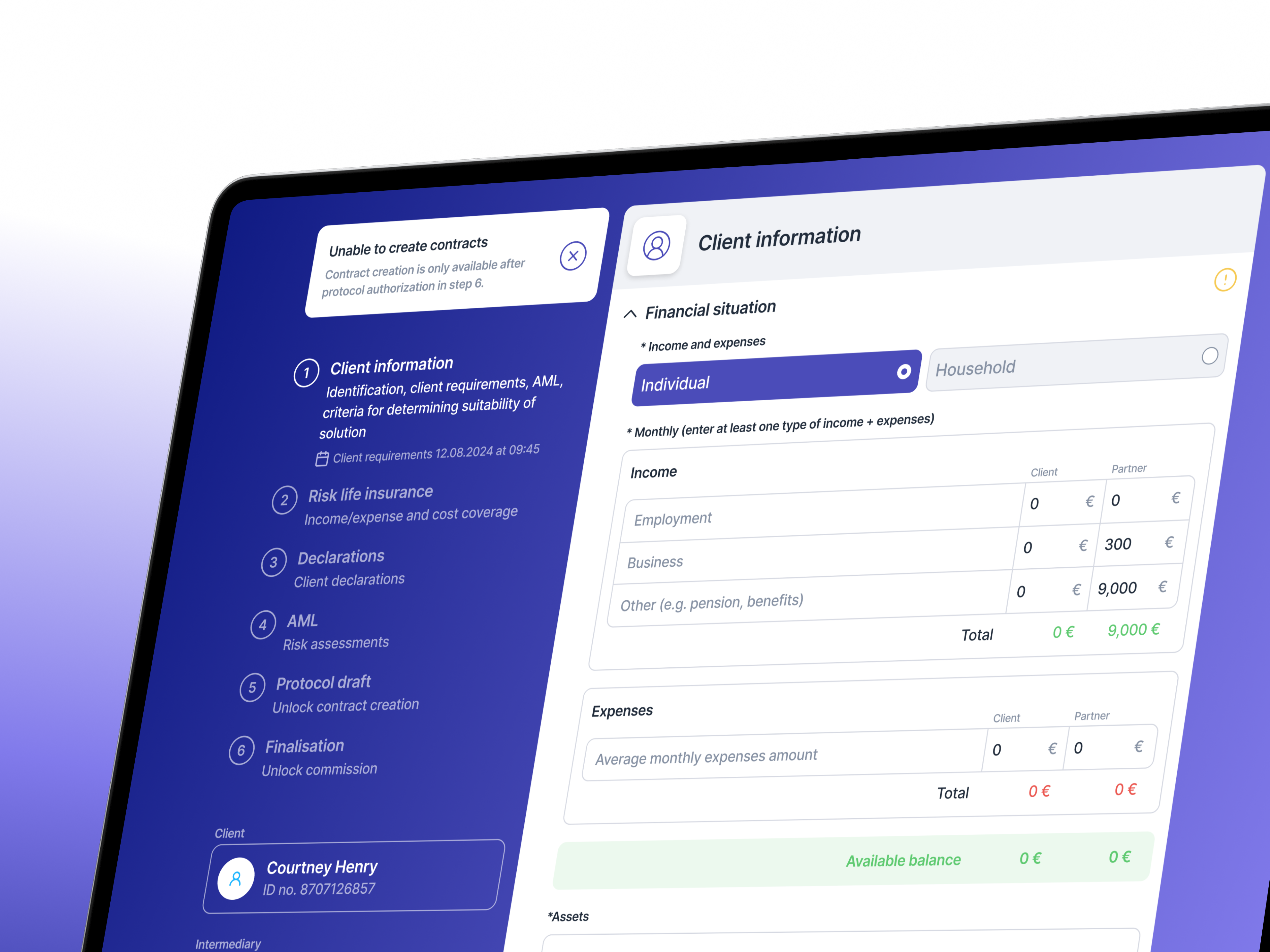
At OVB, a financial services company, the problem wasn't "use AI". Advisers had to prepare a separate protocol for every product a client considered, in an application that was slow and unstable. We built Multiprotokol, which combines products into one guided protocol, reuses client information from existing systems, and routes cases that need legal approval to the right people. OVB reported a 50% reduction in protocol preparation time across more than 11,000 protocols a month.
Much of that outcome came from workflow redesign, data connections and clear rules, not from a model. That is the point: AI is one tool in the job of making a process work better.
Your next step
Bring three recurring workflows to a short session with their owners. For each, write down how often it happens, how long it takes and which steps need interpretation. Leave with one workflow, one baseline and one person accountable for the pilot.
If you'd rather have a team that learns your processes and builds the software to improve them, without hiring an internal department, that's what we do at Outloud. Tell us about the workflow your team is tired of doing.
Sources
- RAND Corporation (2024), The Root Causes of Failure for Artificial Intelligence Projects and How They Can Succeed
- Gartner press release (29 Jul 2024), 30% of GenAI projects abandoned after proof of concept by end of 2025
- Eurostat (Dec 2025), Use of artificial intelligence in enterprises
- Microsoft & LinkedIn (2024), Work Trend Index: AI at Work Is Here. Now Comes the Hard Part
- McKinsey (2025), The State of AI: Global Survey 2025
- McKinsey (Mar 2025), The state of AI: How organizations are rewiring to capture value
- MIT NANDA (2025), The GenAI Divide: State of AI in Business 2025 (via Fortune coverage)
- Moffatt v. Air Canada, 2024 BCCRT 149
- Fortune (9 May 2025), Klarna plans to hire humans again
- Brynjolfsson, Li & Raymond, Generative AI at Work (NBER w31161; QJE 2025)
- Outloud case study, OVB Multiprotokol